Tuesday, February 28, 2017

2017 Q1 All-Hands

Every quarter, the fully remote SilviaTerra team assembles from all corners of the world, rents a house, and spends a week building new features and planning future conquests.

The SilviaTerra squad manages to not fall into any canals
Thanks to Travis Pond for his services as the SilviaTerra team picture guy!

We just wrapped up our 2017 Q1 All Hands in The Hague, Netherlands.  This was our first All-Hands meeting outside of the US and it was a great success.  No one fell into any canals, although apparently about a car a week does in the Netherlands!  In addition to the sightseeing and delicious Dutch food, we made major technical progress on:

  • The upcoming version of Plot Hound with customizable data entry
  • Improvements to CruiseBoost for both large and small properties
  • Change detection using a variety of imagery platforms

If that sounds like a good time to you, we'd love to meet you!  Drop us a line at https://silviaterra.com/bark/jobs.html

Thursday, February 16, 2017

Stumpage Value and Product Groups for Merch Specs

We're dedicated to the foresters we serve and we're always investing in Plot Hound and Canopy to make them better and more useful tools.  Since we launched our merch specs system in late 2015, we have had many great conversations with foresters across America who use Plot Hound and Canopy as their main cruising platform.  The top two requests we heard were product groups and stumpage pricing.  Starting today, both of those features are live!


The "Product Group" field allows you to assign each of your products to a product group.  If you have a volume subscription, your volumes will now be summarized by both product and product group.  This works great for cases where you want rollups of general product groups like Sawtimber that contain distinct products like Pine Saw and Hardwood Saw.

You can also now assign a stumpage value for each of your products.  If you are signed up for one of our volume reporting service, your reports will include a summary of stumpage value by product and product group.

We've also invested in some performance engineering on the backend, so the merch specs page is faster than ever. Our mission is always to save you time on the computer you can spend more time in the woods and with your clients.

We are always looking for feedback on how we can improve Canopy and Plot Hound.  Feel free to drop us a line at support@silviaterra.com if you have any suggestions or need any help.

Monday, January 9, 2017

Revamped Cruise Setup

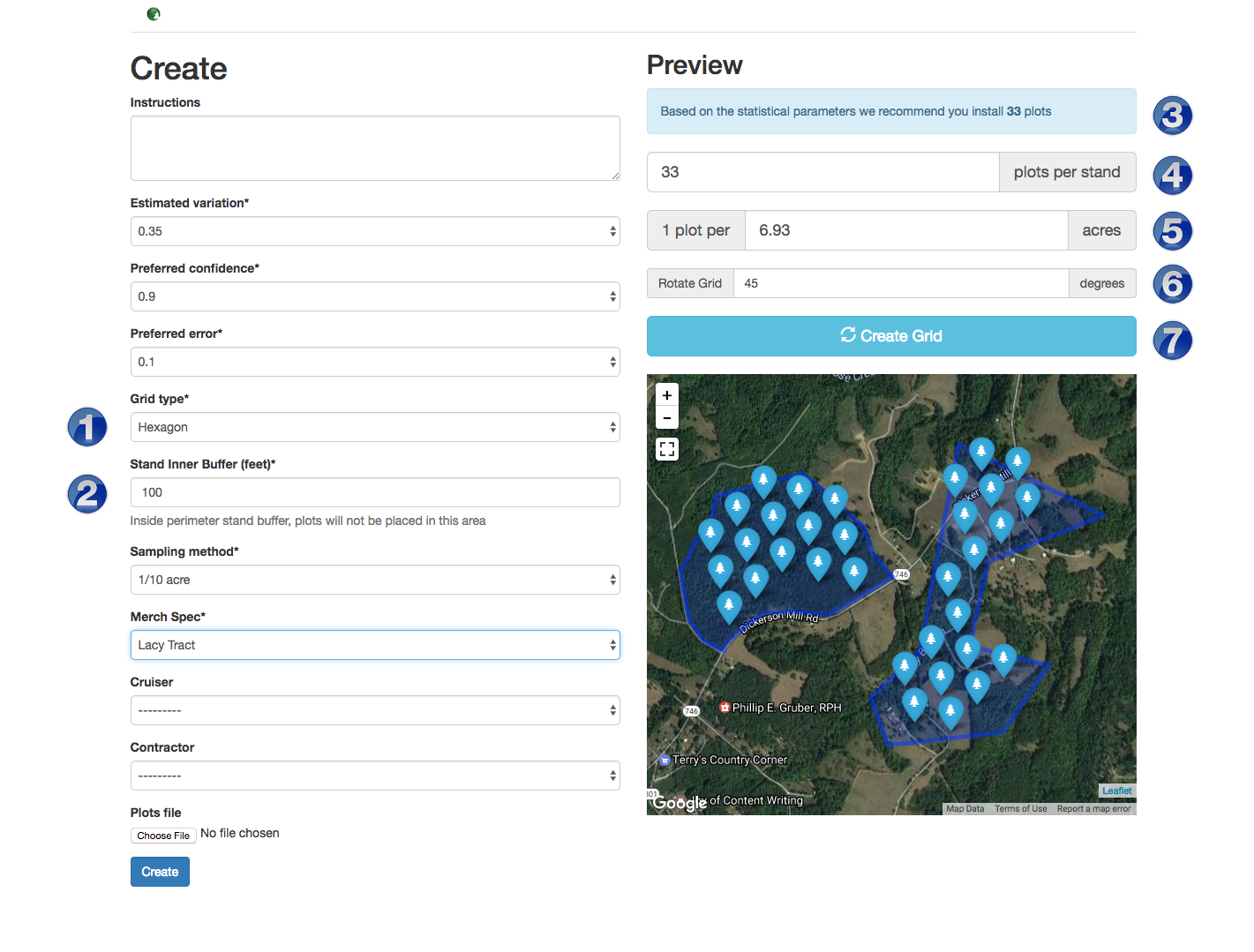
We have just deployed updates to Canopy that give you more control when setting up your cruise!  We have had a lot of requests for new features and we have answered the call!  Our new updates offer you the ability to set up hexagonal, square, and rectangular grid types as well as random points (1).  Rectangular grids offer the ability to manually set the distances between points and lines.  Now you can set up any grid spacing you want!  Running lines north and south isn’t always the most efficient layout, so we have also built in a grid rotation feature (6).  If you are concerned about edge plots (and willing to accept the sampling bias associated with avoiding edge ), we offer you the ability to set an inner bounds buffer where plots won't be allocated (2).  As an example if you don't want to take any plots within 25 feet of the stand boundary, just set the inner bounds buffer to 25.  Simple as that.
plot_shot.png


The overall process is slightly different from the previous version, where we would use the statistical parameters you entered to automatically create a grid.  Now, instead of automatically setting up a grid, we calculate the number of plots you need based on the statistical parameters and display it above the plots per stand box (3).  You then enter the number of plots you would like in the plots per stand box (4).  If you have a plot density you want to use, say 1 plot per 2 acres, you can enter that in the plots per acre input box (5) to create the grid.  After you set your inputs, just click on 'Create
Grid' (7).

Top Left - Hexagonal Grid, Top Right - Square Grid,
Middle Left - Rectangular Grid, Middle Right - Random Point Grid,
Lower Left - Rotated Grid, Lower Right - Grid with an inner buffer applied

 You may notice that sometimes you don't get back the exact number of plots you requested.  When laying out grids it is nearly impossible to adjust the spacing so that you come up with the correct number of plots 100% of the time.  Our past system worked around this by creating more than enough plots and then randomly dropping some until the right number was achieved.  This worked well, but sometimes left weird holes in your grid, and we thought we could do better.  This time around we chose not to drop any plots and tried to get the plot count as close as we could. If you are not satisfied with the grid you can simply click 'Create Grid' again, and let the layout algorithm try again.

We are always looking for feedback on how we can improve our system.  Feel free to drop us a line at support@silviaterra.com if you have any suggestions or need any help.

Friday, November 18, 2016

2016 Q4 All Hands

Every quarter, the fully remote SilviaTerra team assembles from all corners of the world (we are located on multiple continents now), rents a house, and spends a week building new features and planning future conquests.


We just wrapped up our 2016 Q4 All Hands in Arnold California situated in the Sierra Nevadas.  We had a great time and some of the highlights included:

  • Visiting Calaveras Big Trees State Park and seeing some of the biggest trees in the world!
  • Revamping and simplifying the way we handle plot allocation for all our cruises
  • Discussing exciting future product offerings 


If that sounds like a good time, we'd love to meet you!  Drop us a line at https://silviaterra.com/bark/jobs.html

Tuesday, November 8, 2016

New website launched!

We're proud to announce the launch of our new website!  The new site has lots of new information, demos, and FAQs about our three main products:

  • CruiseBoost - Save up to 50% of your cruising cost.  Imagery-assisted cruising for everyone.
  • Plot Hound - The timber cruising app.  Easy, Fast, Free.
  • Canopy - The best way to manage the cruising process for individuals or teams

We're gearing up for a lot of great new stuff in 2017 - stay tuned!


Friday, November 4, 2016

2016 in Madison!

 
We're wrapping up a great week at the Society of American Foresters National Convention in Madison, Wisconsin. It's been wonderful to talk with so many Plot Hound users and visit with foresters from around the country.  We're proud to be part of SAF and look forward to seeing more of you next year!


Tuesday, October 25, 2016

T-Cruise Data Integration


We think Plot Hound is the best cruising platform out there, but we also don’t want to exclude anyone who chooses to use other cruising software packages. That’s why we’re excited to announce the integration of T-Cruise data into Canopy. This means that you can use Canopy to manage the full cycle of your inventory projects without changing the way you collect your data!

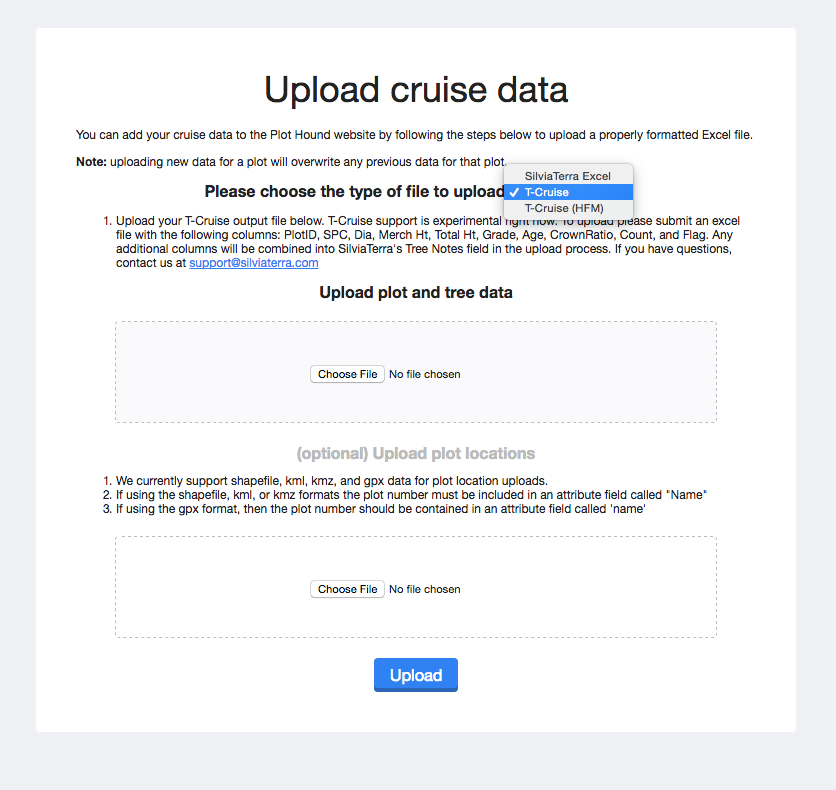
Canopy can be used to set up your cruise. You can then download the plot location files (shapefiles, kml, or gpx) and load them up on your favorite data recorder and go out and collect your data. Once back in the office you will need to export the T-Cruise data into an Excel format (.xls, or .xlsx) and then log back into Canopy. From the cruise detail page select the ‘Upload Cruise Data’ option. From the next page, select T-Cruise as your upload file type and then select your file to upload. If you have updated GPS plot locations you can upload those as well.


Screen Shot 2016-10-24 at 11.20.52 AM.png


T-Cruise is just the start. We are working on ForestMetrix and Two Dog integration and hope to have that rolled out soon. Check back for updates!