Wednesday, October 14, 2015

New Plot Hound! Smarter, Faster, Tablet-Optimized

SilviaTerra is thrilled to announce a brand new, totally rebuilt version of Plot Hound that has been optimized for tablets and is still great for phones. It’s available as a separate app from the current build of Plot Hound, so you’ll need to download it from the App Store or Google Play.

We’re really excited about the new and improved user experience we’ve created, especially for our tablet-using cruisers. There are three main areas of improvement to highlight, and we’ll take a look at each of them below:

  • Speed of data entry
  • Better navigation
  • Improved layout on big screens

Speed of Data Entry

Get more done, faster!


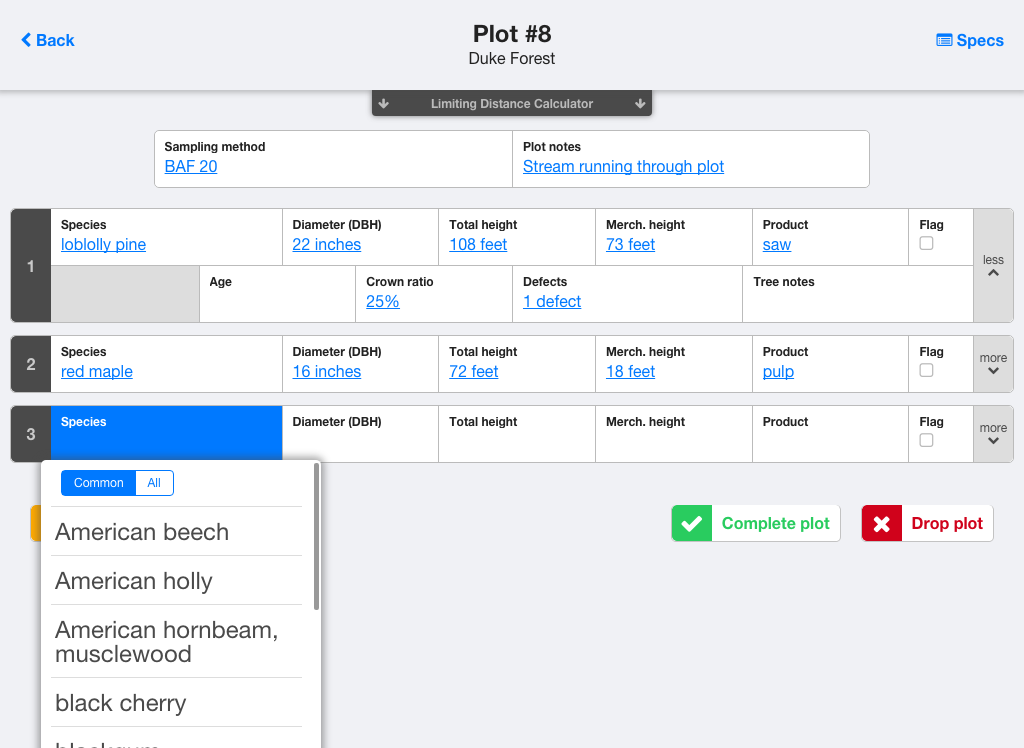
  • Auto-advancing input box with common options listed first
    • You can still manually type in data if you need to
  • Toggle switch for more advanced options and preferences
  • The list of all the trees in your plot is visible as you're entering data, making it easy to track your progress.
  • Limiting distance calculator included to save you time in the woods

Better Navigation

Finding your way has never been easier!


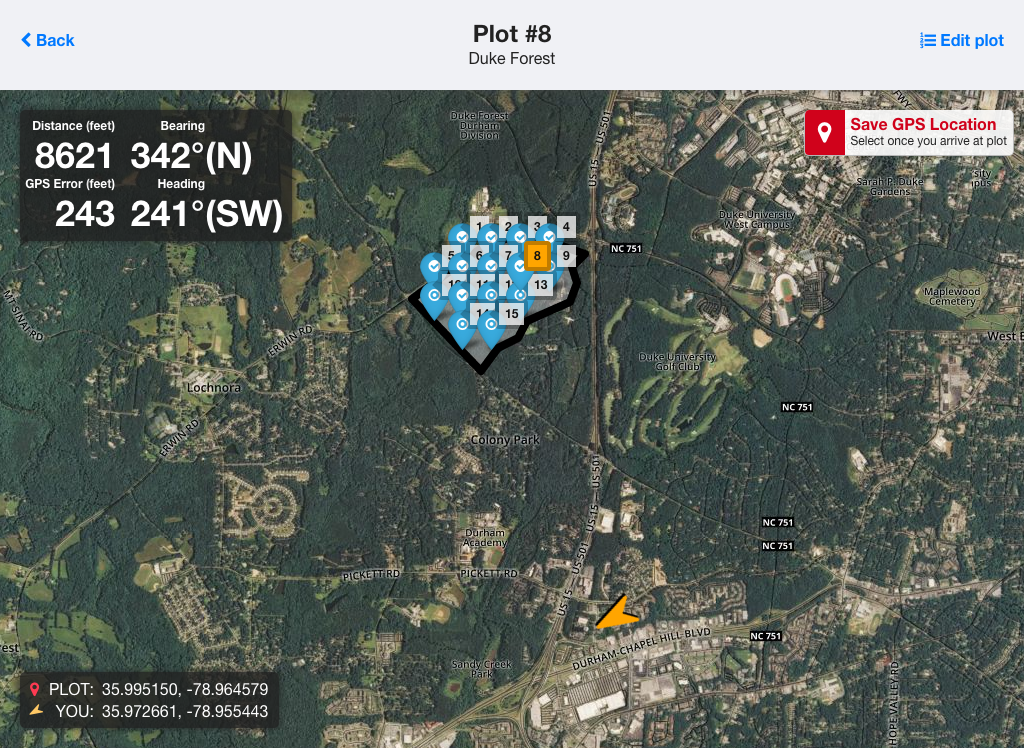
  • We integrated the map and compass pages to show your position and heading on the map relative to plots.
  • The GPS and compass update constantly, so you can determine where to go in real time.
  • Added a World Magnetic Map to accurately account for declination everywhere
  • Added latitude/longitude readouts for cruisers with a dedicated GPS device.


Improved Layout on Big Screens

Visualize the whole cruise like never before!

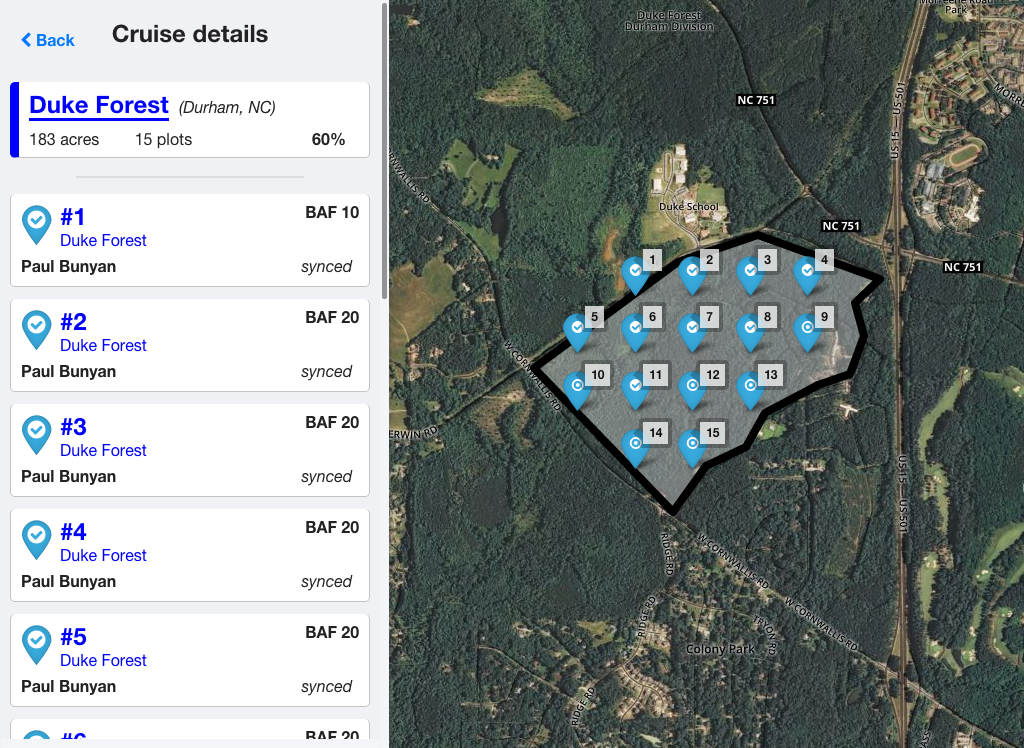
Cruise page on a tablet


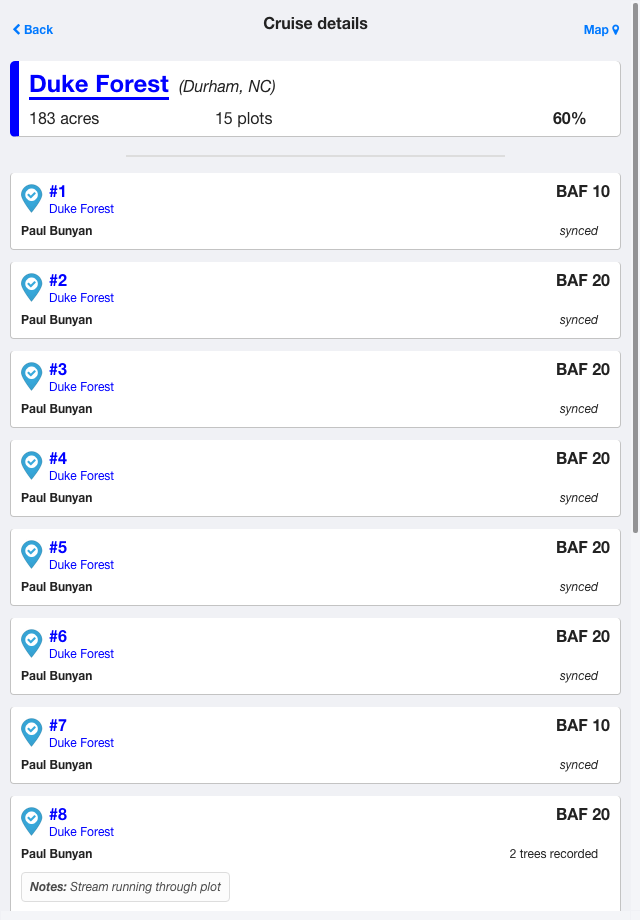
Cruise page on a phone - note the toggle for map view in the top right


  • When we first released Plot Hound in 2010, the iPad hadn't even come out yet.  We built Plot Hound to work well on the small screen of a mobile phone. After the iPad was released, the tablet version was merely that same interface blown up.
  • Now, we intelligently expand the UI to make the most of the additional real-estate.
  • Plot Hound still works great on phones.

We're gradually rolling out Plot Hound 5.0 over the next few weeks.  The new Plot Hound is an entirely new app, so you'll need to download it directly from the App Store or Google Play. Don’t worry, it’s still free!

You’re going to love the new, tablet-optimized Plot Hound. Happy cruising!

By the way, if you have any questions, feel free to contact us. We love to help.

Thursday, September 24, 2015

New Feature: a 100% tally plot type

You asked for a 100% tally plot type, and we listened!


Many of you have asked for this feature for tasks like timber marking or a final pre-harvest cruise, and also for some creative applications such as orchard monitoring and intensive cruising for a specific rare or invasive species.


To usher in this new functionality, we want to give you this tutorial for setting up a 100% cruise:


Select ‘100% tally’ as your plot type.
Screen Shot 2015-08-28 at 9.44.09 AM.png
Manually enter ‘1’ as the number of plots in the cruise.


Screen Shot 2015-08-28 at 9.45.28 AM.png
Then head to the woods!


You won’t have to worry about navigating to the plot center before you start cruising.  Because that plot is going to be in the center of your stand, you can just start recording from whatever point in the stand makes sense for you!

Currently, a free cruise report for a 100% tally cruise will summarize the data with a stand table and stand-level statistics. Diameter distribution figures are not available quite yet, but will be in an update coming soon!  A Premium Report for a 100% tally cruise will have all the usual summaries except for standard error estimates, because there’s only one plot in the cruise.


If you have any questions, please let us know.  We’ll be updating our free reports soon with more available figures, including distribution figures for any plot type. Stay tuned!

Monday, September 14, 2015

Why You Need Premium Reports

When you cruise with Plot Hound, you will always have access to free reports summarizing your cruise.  SilviaTerra’s free reports include stand tables (trees per acre by species and diameter) and figures showing diameter distributions by species and species group.  All of you have to do to get those reports is go to your account on our website, where you can view and download the information.

SilviaTerra’s premium reports are available through a subscription, either monthly or annually. For a single cruiser, a premium report subscription is $50 per month, or $500 per year.  A premium reports subscription gives you an unlimited number of reports each month, with unlimited and customizable merchantability specs and a wide selection of downloadable tables to make the data work for you. We're investing heavily in building beautiful, informative reports and those improvements will be included in your subscription. The contents of our volume reports are described in more detail here.

Larger organizations may choose a professional subscription rather than a premium reports subscription.  A professional subscription allows you to manage cruisers within your organization as well as contract cruisers.  The dashboard for your organization lets you see the progress of all of your cruisers on all of their assigned cruises, so you always know what’s happening. This provides straightforward overview of your whole team - all you have to do is sign in! Professional subscriptions cover all your cruisers for just $250 per month, or $2500 per year.
Screen Shot 2015-09-04 at 2.39.24 PM.png
To sign up, just click on the ‘Settings’ link on your Dashboard, and then Subscription. You’ll see the available tiers, and have the ability to select, subscribe, and pay with a credit card from that page.

Screen Shot 2015-09-04 at 2.39.44 PM.png

If you’re part of a larger company that may be interested in custom solutions and reports tailored to your organization's needs, contact us about arranging an Enterprise solution. Some of the largest forestry companies in the nation have worked with SilviaTerra to customize Plot Hound and Canopy to simplify their workflow and get consistent, custom reports for every cruise they do, saving them lots of time and making their results much easier to understand. Premium reports make it possible to give you the best possible data so that you can make the right decisions. Sign up today!

Photo credit: Travis Pond


Tuesday, August 4, 2015

Introducing our NEW Premium Reports!

SilviaTerra is thrilled to announce the new version of our premium reports! 


We hope this post will help to familiarize you with the components of these new-and-improved reports.


At the top of the new report format is a summary of information about your cruise and your stand:

Screen Shot 2015-07-28 at 10.04.27 AM.png


Next, we provide estimates of overall trees per acre and basal area for the stand:

Screen Shot 2015-07-30 at 2.18.11 PM.png

and then the same data, broken down by species:

Screen Shot 2015-07-28 at 10.07.05 AM.png
This gives you a comprehensive overview of your stand, and the precision of each of these inventory statistics.


Next, the report provides a stand-level overview of volumes . As we discussed in our last post, our new merch spec system lets you set different units for different products.  We provide a stand-level estimate of mean volume in each of the units specified:

Screen Shot 2015-07-28 at 10.09.01 AM.png


The report then includes a table showing volume by species and product. We show the estimate of sampling error for this table as well, to demonstrate the precision of that estimate based on the variability among the plots in your cruise.


A figure with the same information as this table is also included.


Examplevols.png
If you have questions about how our volumes are calculated, look back at our recent series on this topic, where we compared traditional look-up tables and form class approaches to SilviaTerra’s volume system.


So, there you have it! The new premium reports contain stand-level and species-level information about trees per acre, basal area, and volumes.  If you decide you want to use a different set of merch specs, rerunning the report is easy- simply update the merch specs (checking to make sure your product names match the product calls you made in the field!), and the report will be rerun.


Our new premium report has more information and more detail than our previous volume reports, and there are even more additions coming soon.  


Have an idea you think we should include in our reports? Let us know! We want these reports to be as useful to you as possible, and your feedback makes that happen.


Our New Merch Spec System has Arrived!

We have recently launched a new system for defining merchantability specifications for a cruise.  These specs are used in two ways. First, they define the products you can call in the field when you’re cruising with Plot Hound.  Second, they are used in calculating volumes for a premium report once your cruise is completed.  

You can easily create new merch specs from your account on our website. There’s a link to the merch specs associated with each cruise and a drop-down menu to change them visible on the summary page for each cruise.

You start out with a set of ‘template’ merch specs- you can copy these and modify them for use with each new cruise. You can also save merch specs you create for a particular cruise as a new template, so that you can use it as the basis for other merch specs in the future. With time, you will build yourself a ‘library’ of custom templates specific to the forest types and size requirements for your typical cruises.

There are some top-level choices you make for a set of merch specs- the name, whether you’re in the eastern or western US (contact us if you’re outside the USA!), and whether it should be the default for all your cruises.  You’ll also need to indicate if you want to merchandize topwood.  If a trees should be able to produce more than one product (a pulp stick cut from above a saw log, for example), then ‘merchandize topwood’ should be marked! Otherwise, only one product will be taken from each stem.

Screen Shot 2015-08-04 at 2.47.29 PM.png


Then, you can define as many ‘product rules’ as you want!  Each rule at minimum takes a name and a list of allowable species.  You can specify a minimum and /or maximum butt diameter, and a minimum top diameter as well.  Please note that all of these settings are for outside bark diameters. You can also specify unique units for each rule.  

Each product rule also has a more detailed menu of options that’s ‘hidden’ by default- these include ‘require explicit product call’, a key feature that means that product will only be used for trees where that product was specified in the field.  For example, if you are defining a ‘veneer’ product, meeting dimensional rules would not be sufficient if that requirement was in place- you’d also have to have called that tree ‘veneer’ when measuring it.  There’s also a ‘require full butt log’ option, which allows us to apply Scribner ‘long log’ rules in bucking and scaling.
Screen Shot 2015-07-29 at 3.23.43 PM.png
Product rule ordering is extremely important- trees are checked to see if they meet the rules from the top down, so in general, you should put the most valuable and largest products at the top.  

If you have multiple sawtimber species in your cruise, our premium reports will automatically include a breakdown of product by species. This means you don’t need to define separate sawtimber categories for each species (Sugar maple sawtimber, red oak sawtimber). One sawtimber product rule with multiple allowable species is all that’s necessary, because you’ll get a breakdown of that product from each species in your final report.

We’ll have a video up on our website soon that will walk you through this process.  We’ve designed the system with you in mind, and we think you’ll find it intuitive.  If you do encounter difficulties, we are here, as always, to assist you if you need help.

Wednesday, July 22, 2015

Variable radius plot sampling- Know before you go!

Variable radius plot sampling, also known as point sampling, is an awesome technique to use for fast, efficient cruising. Variable radius plots also provide a quick estimate of basal area. Because forest volume is closely related to basal area, cruising with variable radius plots makes it possible to do a back-of-the-envelope volume estimate for the stand, if you know the approximate ratio of volume to basal area for your forest type. In this blog post, we will clarify best practices for this technique and troubleshoot some common problems that can occur if it isn’t used properly.

When cruising with variable radius plots, it’s important to use the right basal area factor (i.e. the right size prism) for your forest type, or your estimate of trees per acre could end up far higher or lower than your expectations (and reality). Before you cruise with point sampling, it’s important to understand that under certain conditions, the ease of point sampling comes with a cost in precision in the calculation of trees per acre. Higher BAFs, clumpier forests, and lower minimum diameters result in lower precision in the measurement of trees per acre. (The mean estimate is still accurate, but the confidence interval around that mean is expected to be wider than, for example, a mean from the same number of plots cruised using a lower BAF prism.)

Using this method, every ‘in’ tree in your plot represents a constant value of basal area per acre. For example, if you’re cruising with a BAF 10 wedge prism, that value is 10 square feet. The contribution of any given tree to your calculation of trees per acre, however, varies. Think of it this way: around every tree there is an imaginary circle. The radius of that circle depends on the basal area factor of the prism you used and the diameter of the tree. Small trees have very small circles around them; larger trees have very large circles. If the imaginary circle around the tree would overlap with the center of your plot, that tree appears ‘in’ through your prism. In fixed area plots you multiply, for example, the number of trees in a 1/100th acre plot by 100 to get an estimate of trees per acre. Not so with variable radius plots. Imagine the circles around trees in your variable radius plot are small fixed-radius plots. A tree in a very small plot would represent a much higher estimate of trees per acre than a tree in a large plot.

Periodically, we get questions from Plot Hound users who are surprised by what seem like ‘unreasonably high’ trees per acre estimates from their cruise report.  In most cases, these high tpa estimates are the result of measuring small-diameter trees using a relatively large basal area factor- for example, cruising with a BAF 20  prism.  In this context, the high estimate of trees per acre isn’t necessarily accurate, but it should be expected, because the basal area factor chosen might not have been suited for that forest. For the most accurate results, use a larger BAF value in stands with predominantly larger trees, and a smaller BAF for stands with smaller ones.

Here’s a quick example of how to calculate trees per acre from a variable radius plot.  When you download your cruise data from Plot Hound, you’ll see that we’ve calculated and included the ‘Tree Expansion’ value for you. This indicates the number of trees per acre that stem represents, within its plot.


Plot Number
Sampling Method
Cruiser
Diameter (in)
Species Common Name
Species Scientific Name
Tree Expansion
1
BAF 10
Nan Pond
4
sugar maple
Acer saccharum
114.59
1
BAF 10
Nan Pond
3
sugar maple
Acer saccharum
203.72
2
BAF 10
Nan Pond
8
red maple
Acer rubrum
28.65
2
BAF 10
Nan Pond
8
red maple
Acer rubrum
28.65
2
BAF 10
Nan Pond
9
red maple
Acer rubrum
22.64
2
BAF 10
Nan Pond
4
american beech
Fagus grandifolia
114.59
3
BAF 10
Nan Pond
19
red maple
Acer rubrum
5.08
3
BAF 10
Nan Pond
8
red maple
Acer rubrum
28.65
3
BAF 10
Nan Pond
8
american beech
Fagus grandifolia
28.65

The expansion factor equation for a given tree using a variable radius plot is BAF / basal area for the stem, or,  

10 / (0.005454 * dbh2)
Then, we calculate the total TPA in each plot - by adding the expansion factor for all trees within a plot. In this example, we have:
Plot 1: 114.59 + 203.72 = 318.31 TPA
Plot 2:  28.65 + 28.65 + 22.64 + 114.59 = 194.53  TPA
Plot 3: 5.08 + 28.65 + 28.65  = 62.38  TPA

Because plot 1 had smaller trees in it, the trees per acre estimate for plot 1 is much higher than the other plots. When they are measured, they represent a large contribution in terms of trees per acre.

Then we average the TPA from each plot to get the average trees per acre for the stand - in this case, 191.74 trees per acre.
The basal area is much easier to calculate. It’s simply the basal area factor used multiplied by the number of trees in each plot.

Plot 1: 10 * 2 trees = 20 ft2
Plot 2: 10 * 4 trees = 40 ft2
Plot 3: 10 * 3 trees = 30 ft2

The average basal area for the stand is 30 ft2 per acre.

Variable radius plots are a quick and simple way to record inventory, which makes them very appealing. Just remember: it’s worth taking a minute to think about the forest type you’re cruising before you grab your prism and head to the woods. Using the appropriate basal area factor will help you get the most accurate representation of your forest from your cruise.